Web3D库Threejs入门教程
前言
Three.js 是一个功能强大的 JavaScript 图形库,用于在浏览器中创建三维图形和交互式可视化效果。它由 Ethan Demello 和 Mike Bosted 于 2010 年开发,并迅速成为前端开发者必备的工具之一。
官网
GitHub-Repo-JavaScript 3D Library.
不同3D库对比
The <model-viewer> project
Easily display interactive 3D models on the web and in AR!
官网——Easily display interactive 3D models on the web & in AR
This is the main GitHub repository for the <model-viewer> web component and all of its related projects.
Getting started? Check out the <model-viewer> project!
The repository is organized into sub-directories containing the various projects. Check out the README.md files for specific projects to get more details:
👩🚀 <model-viewer> • The <model-viewer> web component (probably what you are looking for)
✨ <model-viewer-effects> • The PostProcessing plugin for <model-viewer>
🌐 modelviewer.dev • The source for the <model-viewer> documentation website
🖼 render-fidelity-tools • Tools for testing how well <model-viewer> renders models
🎨 shared-assets • 3D models, environment maps and other assets shared across many sub-projects
🚀 space-opera • The source of the <model-viewer> editor
BabylonJS
官网
Three.js 安装与配置
安装Three.js 库
Three.js 提供了两种安装方式:通过 CDN 或者自定义路径。
使用 CDN
<script src="https://cdnjs.cloudflare.com/ajax/libs/three.js/r128/three.min.js"></script>
自定义路径
如果您的项目需要特定的版本或修改,可以选择下载并安装three.js 库。
npm install three@latest
配置项目
在项目中导入以下文件:
index.html:用于创建 HTML 页面。style.css:设置页面样式和布局。src/your_project.js:主要脚本文件,用于初始化Three.js 环境并运行代码。
完成这些步骤后,你应该能够看到浏览器中的默认场景设置。如果出现错误,请检查网络连接或查看浏览器的开发者工具(Ctrl+Shift+I)。
实践——ThreeJS结合Vue3展示glTF模型
gltf-viewer-basic在线展示
启用Vue
逐步执行如下命令:
 1
 2
 3
 4
 5
 6
 7
 8
 9
10
11
| pnpm create vite@latest . --template vue-ts
pnpm install
pnpm add three@latest
pnpm add dat.gui
pnpm add @types/dat.gui
pnpm run dev
|
App.vue
 1
 2
 3
 4
 5
 6
 7
 8
 9
10
11
12
13
14
15
16
17
18
19
20
21
22
23
24
25
26
27
28
29
30
31
32
33
34
35
| <!--
使用 GLTFLoader 加载远程 glTF 模型,对模型进行居中与缩放后配合轨道控制器查看。
-->
<script setup>
import { onMounted } from "vue";
import Application from "./Application";
onMounted(() => {
const application = new Application("webgl");
});
</script>
<template>
<canvas id="webgl"></canvas>
<div id="gui"></div>
</template>
<style>
html {
overflow: hidden;
}
html,
body,
#webgl {
margin: 0px;
padding: 0px;
}
#gui {
position: absolute;
top: 0;
right: 0;
}
</style>
|
Application.ts
  1
  2
  3
  4
  5
  6
  7
  8
  9
 10
 11
 12
 13
 14
 15
 16
 17
 18
 19
 20
 21
 22
 23
 24
 25
 26
 27
 28
 29
 30
 31
 32
 33
 34
 35
 36
 37
 38
 39
 40
 41
 42
 43
 44
 45
 46
 47
 48
 49
 50
 51
 52
 53
 54
 55
 56
 57
 58
 59
 60
 61
 62
 63
 64
 65
 66
 67
 68
 69
 70
 71
 72
 73
 74
 75
 76
 77
 78
 79
 80
 81
 82
 83
 84
 85
 86
 87
 88
 89
 90
 91
 92
 93
 94
 95
 96
 97
 98
 99
100
101
102
103
| import * as THREE from "three";
import { OrbitControls } from "three/addons/controls/OrbitControls.js";
import World from "./World";
const cameraOptions = {
position: {
x: 6,
y: 3,
z: 8,
},
target: {
x: 0,
y: 0,
z: 0,
},
};
export default class Application {
canvas?: HTMLElement;
camera!: THREE.PerspectiveCamera;
renderer!: THREE.WebGLRenderer;
controls!: OrbitControls;
scene = new THREE.Scene();
world!: World;
constructor(id: string) {
const el = document.getElementById(id);
if (!el) return;
this.canvas = el;
this.initCamera();
this.initRenderer();
this.initControls();
this.addListener();
this.animate();
this.initWorld();
}
// 初始化相机
initCamera() {
const aspect = window.innerWidth / window.innerHeight;
this.camera = new THREE.PerspectiveCamera(45, aspect, 0.1, 1000);
this.camera.position.set(
cameraOptions.position.x,
cameraOptions.position.y,
cameraOptions.position.z
);
this.camera.lookAt(
cameraOptions.target.x,
cameraOptions.target.y,
cameraOptions.target.z
);
}
// 初始化渲染器
initRenderer() {
this.renderer = new THREE.WebGLRenderer({
antialias: true,
canvas: this.canvas,
alpha: true, // 让场景背景透明
});
this.renderer.setPixelRatio(window.devicePixelRatio);
this.renderer.setSize(window.innerWidth, window.innerHeight);
this.renderer.outputColorSpace = THREE.SRGBColorSpace;
this.renderer.shadowMap.enabled = true;
}
// 初始化 OrbitControls(鼠标控制)
initControls() {
this.controls = new OrbitControls(this.camera, this.renderer.domElement);
this.controls.enableDamping = true;
this.controls.dampingFactor = 0.05;
this.controls.target.set(
cameraOptions.target.x,
cameraOptions.target.y,
cameraOptions.target.z
);
this.controls.update();
}
// 初始化世界
initWorld() {
this.world = new World(this);
this.scene.add(this.world);
}
addListener() {
window.addEventListener("resize", () => {
this.camera.aspect = window.innerWidth / window.innerHeight;
this.camera.updateProjectionMatrix();
this.renderer.setSize(window.innerWidth, window.innerHeight);
});
}
animate() {
const renderLoop = () => {
this.controls.update();
this.world?.update();
requestAnimationFrame(renderLoop);
this.renderer.render(this.scene, this.camera);
};
renderLoop();
}
}
|
World.ts
  1
  2
  3
  4
  5
  6
  7
  8
  9
 10
 11
 12
 13
 14
 15
 16
 17
 18
 19
 20
 21
 22
 23
 24
 25
 26
 27
 28
 29
 30
 31
 32
 33
 34
 35
 36
 37
 38
 39
 40
 41
 42
 43
 44
 45
 46
 47
 48
 49
 50
 51
 52
 53
 54
 55
 56
 57
 58
 59
 60
 61
 62
 63
 64
 65
 66
 67
 68
 69
 70
 71
 72
 73
 74
 75
 76
 77
 78
 79
 80
 81
 82
 83
 84
 85
 86
 87
 88
 89
 90
 91
 92
 93
 94
 95
 96
 97
 98
 99
100
101
102
103
104
105
106
107
108
109
110
111
112
113
114
115
116
117
118
119
120
121
122
123
124
125
126
127
128
129
130
131
132
133
134
135
| import * as THREE from "three";
import { GLTFLoader } from "three/addons/loaders/GLTFLoader.js";
import { GUI } from "dat.gui";
import Application from "./Application";
export default class World extends THREE.Object3D {
app: Application;
model?: THREE.Object3D;
ambient!: THREE.AmbientLight;
dirLight!: THREE.DirectionalLight;
gui!: GUI;
constructor(app: Application) {
super();
this.app = app;
this.initScene();
this.initGUI();
this.loadModel();
}
initScene() {
const ambient = new THREE.AmbientLight(0xffffff, 0.6);
const dir = new THREE.DirectionalLight(0xffffff, 1);
dir.position.set(5, 8, 6);
dir.castShadow = true;
dir.shadow.mapSize.width = 2048;
dir.shadow.mapSize.height = 2048;
this.add(ambient, dir);
this.ambient = ambient;
this.dirLight = dir;
const planeGeo = new THREE.PlaneGeometry(10, 10);
const planeMat = new THREE.ShadowMaterial({ opacity: 0.25 });
const plane = new THREE.Mesh(planeGeo, planeMat);
plane.rotation.x = -Math.PI / 2;
plane.position.y = -1.5;
plane.receiveShadow = true;
this.add(plane);
}
initGUI() {
const container = document.getElementById("gui");
const gui = new GUI();
if (container) {
container.appendChild(gui.domElement);
}
this.gui = gui;
const params = {
ambientIntensity: this.ambient.intensity,
dirIntensity: this.dirLight.intensity,
dirX: this.dirLight.position.x,
dirY: this.dirLight.position.y,
dirZ: this.dirLight.position.z,
};
gui
.add(params, "ambientIntensity", 0, 2, 0.01)
.name("环境光强度")
.onChange((value: number) => {
this.ambient.intensity = value;
});
gui
.add(params, "dirIntensity", 0, 3, 0.01)
.name("平行光强度")
.onChange((value: number) => {
this.dirLight.intensity = value;
});
const dirFolder = gui.addFolder("平行光位置");
dirFolder
.add(params, "dirX", -10, 10, 0.1)
.name("X")
.onChange((value: number) => {
this.dirLight.position.x = value;
});
dirFolder
.add(params, "dirY", 0, 20, 0.1)
.name("Y")
.onChange((value: number) => {
this.dirLight.position.y = value;
});
dirFolder
.add(params, "dirZ", -10, 10, 0.1)
.name("Z")
.onChange((value: number) => {
this.dirLight.position.z = value;
});
}
loadModel() {
const loader = new GLTFLoader();
const url =
"https://threejs.org/examples/models/gltf/DamagedHelmet/glTF/DamagedHelmet.gltf";
loader.load(
url,
(gltf) => {
const scene = gltf.scene;
scene.traverse((obj) => {
if ((obj as THREE.Mesh).isMesh) {
const mesh = obj as THREE.Mesh;
mesh.castShadow = true;
mesh.receiveShadow = true;
}
});
const box = new THREE.Box3().setFromObject(scene);
const size = new THREE.Vector3();
const center = new THREE.Vector3();
box.getSize(size);
box.getCenter(center);
const maxDim = Math.max(size.x, size.y, size.z);
const scale = 3 / maxDim;
scene.scale.setScalar(scale);
scene.position.sub(center.multiplyScalar(scale));
this.model = scene;
this.add(scene);
},
undefined,
(error) => {
console.error("加载 glTF 模型失败", error);
}
);
}
update() {
if (this.model) {
this.model.rotation.y += 0.005;
}
}
}
|
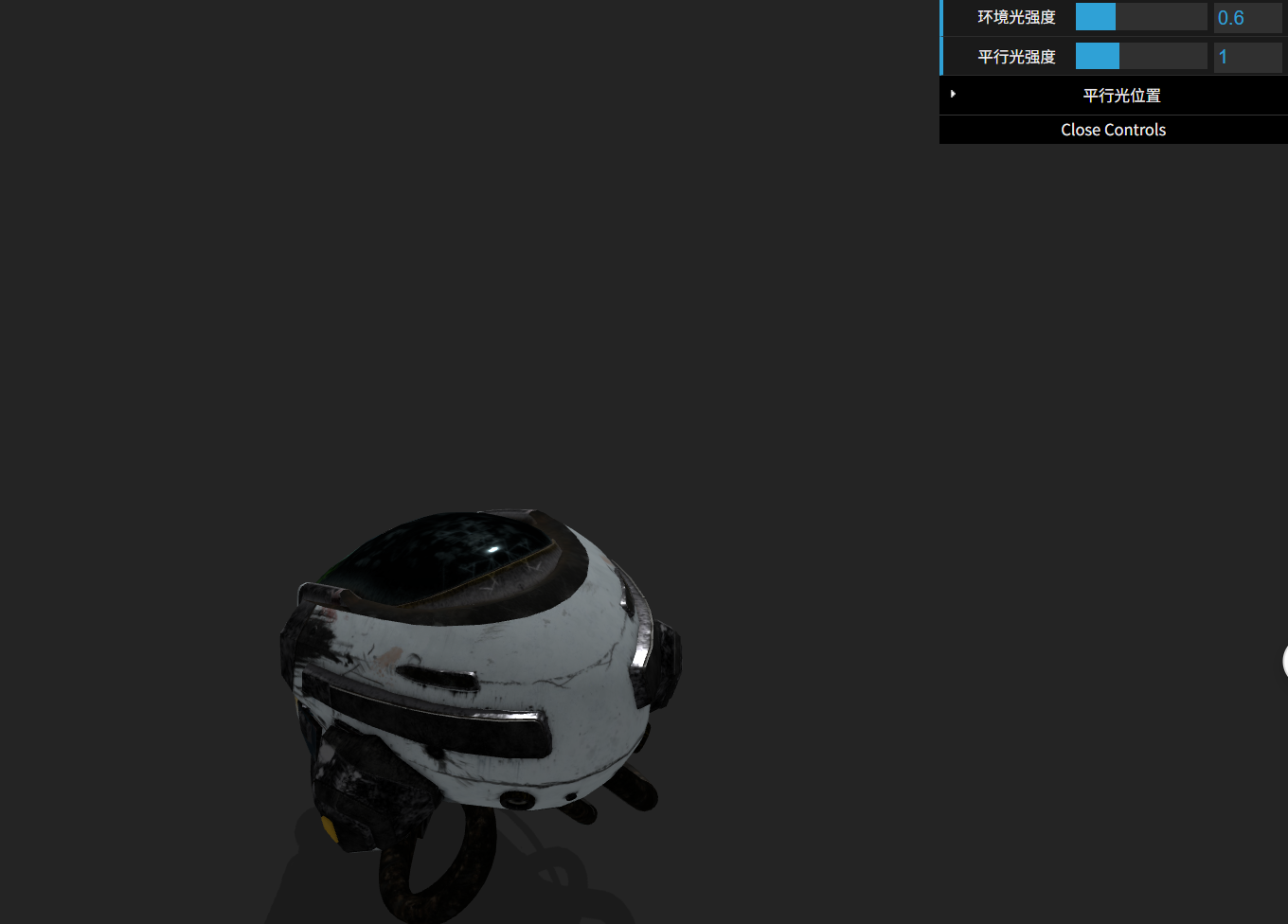
效果展示
模型压缩
当模型比较复杂时,模型的体积就会很大,加载会消耗较多的时间。此时可以通过压缩模型减小体积,优化加载体验。用gltf-pipeline可以实现将一个未压缩的gltf模型转换为用Draco算法压缩的模型。
Draco 是 Google 开源的一种 3D 网格压缩算法,专门用于压缩几何数据(如顶点、法线、UV 等),尤其适合 .gltf/.glb 模型中的 Mesh、Geometry、Animation 等数据。
参考资料
从零开始学习three.js(1):一个完整项目指南
全面的 Three.js 学习平台 • 丰富的交互式示例 • 深入的着色器教程 • 系统性的 GLSL 文档 • 实战项目指导
Three.js 是一个开源 JavaScript 库,您可以使用它来创建具有 2D 和 3D 图形的动态交互式网站。